
A SpeedFusion tunnel is not an automated fix for poor underlying physics; it is a strategic orchestration of available bandwidth. In my 15 years as a Peplink consultant, I've often seen deployments fail because they relied on default settings to solve complex environmental challenges. You likely understand the frustration of packet loss during a live broadcast or a cellular link dropping just as a remote team begins a critical task. It's a common pain point in multi-WAN environments where the complexity often outweighs the perceived benefits.
I'll share the engineering principles I use to ensure a SpeedFusion configuration delivers a stable, bonded connection that behaves as a single logical pipe. We'll move past the marketing promises and focus on the technical reality of building resilient connectivity. I'll explain when to prioritise specific sub-features like WAN Smoothing or Forward Error Correction and how to optimise your network design to reduce the risk of connection drops during mission-critical operations.
Key Takeaways
- Understand how SpeedFusion aggregates diverse transport mediums into a single logical connection to ensure transparent traffic flow across your network.
- Learn to evaluate the engineering trade-offs between bandwidth, reliability, and data consumption when selecting the appropriate mode for your specific application.
- Identify the core infrastructure requirements, such as static IP anchors and FusionHub placement, necessary for a stable SpeedFusion configuration.
- Discover how to optimise underlying tunnel parameters like MTU and MSS to reduce the risk of packet fragmentation and sluggish performance.
- Use centralised management tools to maintain configuration consistency and simplify the process of scaling your network architecture across multiple sites.
Understanding SpeedFusion: Beyond Simple VPN Tunnelling
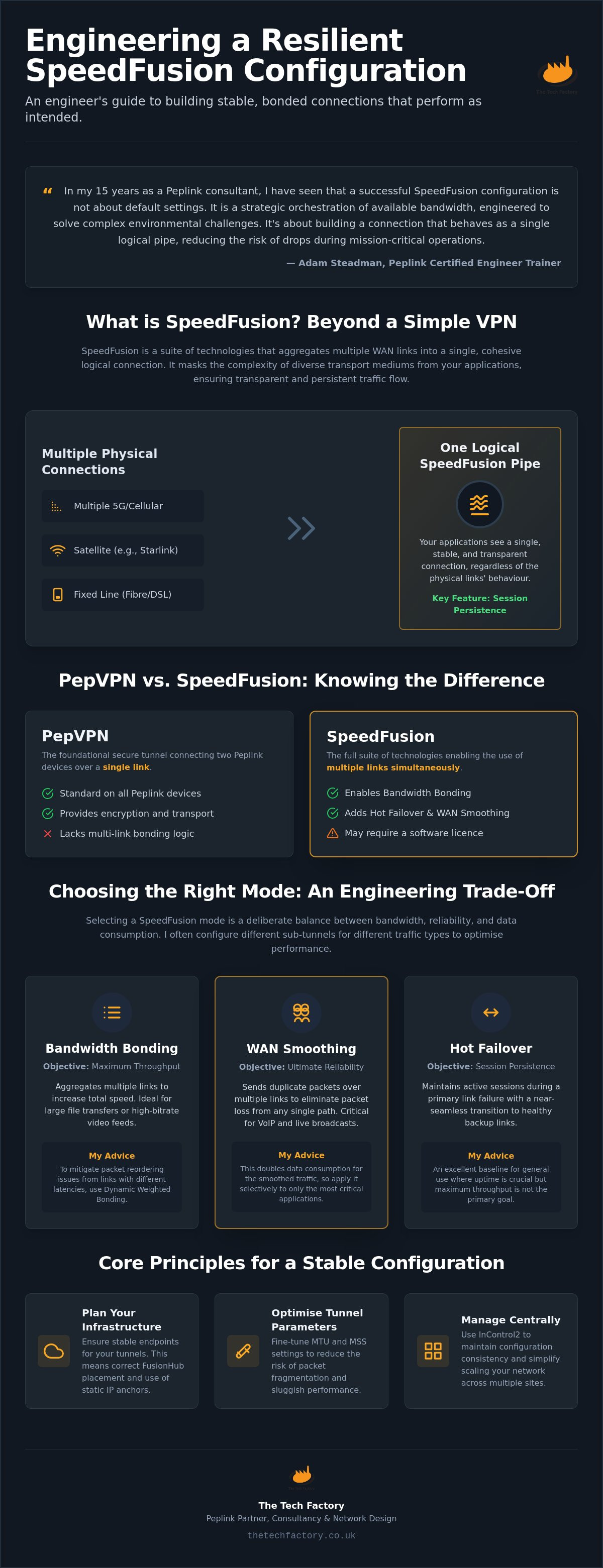
SpeedFusion is often misunderstood as a simple VPN protocol. It is actually an umbrella term for a suite of patented technologies designed to aggregate multiple WAN links into a single, cohesive logical connection. In my 15 years as a Peplink consultant, I have found that a successful SpeedFusion configuration starts with recognising that we are building a tunnel that operates at Layer 2 or Layer 3. This allows the system to provide a transparent path for all traffic types; it doesn't matter if the transport medium is cellular, satellite, or a fixed fibre line.
The key differentiator here is the way the system handles link failure. Standard failover mechanisms often drop active sessions when a primary link goes down. SpeedFusion maintains session persistence even whilst underlying links fluctuate or fail entirely. This is not a marketing promise; it is a calculated engineering choice to prioritise reliability over raw throughput when the stakes are high. In my experience, understanding that SpeedFusion is a suite of tools, not a single setting, is the first step to a successful deployment.
The Logical Connection Concept
The primary objective of SpeedFusion is to mask the inherent complexities of diverse transport mediums from the end-user application. When we design a multi-WAN network design, we are essentially creating an abstraction layer. The application sees one stable pipe, even if that pipe is actually comprised of three different 5G carriers and a Starlink terminal. This abstraction is critical for protocols that are sensitive to timing and packet loss, such as VoIP, corporate VPNs, and live broadcast streams.
By using link aggregation techniques at the packet level, we can distribute traffic across all available paths. If one link experiences high latency or jitter, the tunnel logic compensates by re-routing traffic in real-time. This reduces the risk of a total connection drop during critical operations. It ensures the logical tunnel remains intact regardless of the physical layer's behaviour.
PepVPN vs SpeedFusion: Knowing the Difference
I frequently see confusion regarding the relationship between PepVPN and SpeedFusion. PepVPN is the foundational technology; it is the secure tunnel that connects two Peplink devices over a single link. It provides the encryption and the transport mechanism, but it lacks the advanced bonding and smoothing logic found in the full suite. We transition to a full SpeedFusion configuration when the environment demands the use of multiple links simultaneously.
This involves enabling features like Bandwidth Bonding, Hot Failover, and WAN Smoothing. I recommend checking your device specifications early in the process. Whilst PepVPN is standard across the range, some hardware models require a specific software licence to enable the full SpeedFusion capability. Identifying these requirements prevents technical bottlenecks during the deployment phase.
Choosing the Right SpeedFusion Mode for Your Application
Selecting the correct mode for a SpeedFusion configuration is never a "set and forget" task. It is a deliberate balancing act between available bandwidth, required reliability, and acceptable data consumption. Every configuration choice involves an engineering trade-off that must align with your mission-critical objectives. In my experience, a hybrid approach often yields the best results. We frequently configure different sub-tunnels for different traffic types; for instance, routing VoIP through a smoothed tunnel whilst bulk data uses a bonded path. I always advise practitioners to test each mode under simulated link failure to observe how the tunnel handles real-world fluctuations.
Bandwidth Bonding for Throughput
Bandwidth Bonding allows the aggregation of multiple links to increase total throughput. This is particularly effective for large file transfers or high-bitrate video feeds. However, bonding links with disparate latencies presents a significant engineering challenge. If a high-latency satellite link is bonded with a low-latency terrestrial line without proper management, the overall session may suffer from packet reordering issues. To mitigate this, we utilise features such as Dynamic Weighted Bonding, which intelligently adjusts traffic distribution based on real-time link performance. It's important to remember that bonding is not always the best choice for real-time, low-latency applications where stability is more valuable than raw speed.
WAN Smoothing for Packet Loss Resilience
WAN Smoothing is designed for resilience against packet loss rather than raw speed. The mechanism involves sending redundant packets across multiple links simultaneously. If a packet is dropped on the primary cellular link, its duplicate on the secondary link ensures the application receives the data without needing a retransmission. This is the definitive choice for live broadcasts, remote surgery, or critical command and control scenarios. Engineers must account for the data overhead; doubling or tripling packet transmission will increase data consumption proportionally across all active links. We find this trade-off is usually acceptable when the cost of a dropped packet is high.
Hot Failover for Near-Seamless Redundancy
Hot Failover provides near-seamless redundancy by maintaining an active standby tunnel. Unlike standard WAN failover, which only initiates a connection after a failure is detected, Hot Failover keeps the secondary path "warm." This allows for an almost instantaneous transition if the primary link degrades or fails. For sensitive enterprise applications that cannot tolerate session timeouts, this is the preferred approach. Fine-tuning health check intervals is essential here; shorter intervals allow for faster response but increase the frequency of small keep-alive packets. If you require assistance in selecting the optimal mode for your deployment, our team can provide expert network design services to ensure your infrastructure is engineered for resilience.
Core Infrastructure Requirements for a Stable SpeedFusion Configuration
A resilient tunnel cannot exist in a vacuum. It requires a robust foundation at the network edge and, more importantly, a stable head-end to act as the "anchor" for your remote peers. In my experience, the stability of a SpeedFusion configuration is directly proportional to the quality of the infrastructure at your termination point. Whilst point-to-point hardware tunnels are common, we often find that a centralised, data centre-hosted approach provides the most predictable performance for mission-critical deployments. This setup avoids the common pitfalls of office-based head-ends, such as limited upload bandwidth or lack of power redundancy.
We often guide our clients through the process of Peplink InControl configuration to manage these endpoints effectively. Centralised management allows us to monitor the health of the head-end whilst ensuring that remote units are correctly provisioned. Without a reliable anchor, even the most advanced bonding logic will struggle to maintain session persistence when underlying links fluctuate. It's about creating a fixed point in space that your mobile units can always find, regardless of their current physical location or the carrier they are using.
The Role of FusionHub
FusionHub is a virtual appliance that bridges your mobile hardware to the public internet or your corporate LAN. Unlike hosted consumer services, a private FusionHub instance gives you total control over the environment. You must size your FusionHub instance carefully based on the number of peers and your total throughput requirements. A common mistake is under-provisioning the virtual CPU or RAM, which can lead to tunnel instability under heavy load. We typically deploy FusionHub on AWS, Azure, or private hypervisors. This choice depends on your existing cloud strategy and the geographical proximity to your remote sites, which helps keep latency within acceptable bounds.
Public IP and Port Forwarding Essentials
At least one side of the SpeedFusion tunnel must be reachable from the outside world. This usually means the head-end requires a static, public IP address. If both sides are behind NAT (Network Address Translation) without a public-facing IP, the tunnel will fail to establish. You must configure your firewall rules to allow traffic on specific ports. By default, Peplink uses UDP port 4500 for the data stream and TCP port 32015 for the initial handshake and management. If a static IP is absolutely unavailable at a remote site, we use Dynamic DNS as a fallback, though this is a secondary choice for high-stakes environments. Ensuring these port forwarding rules are correctly implemented is a non-negotiable step in building a resilient network architecture.
Optimising Configuration Parameters: MTU, MSS, and Encryption
Fine-tuning underlying tunnel parameters is where true engineering expertise becomes apparent. A basic SpeedFusion configuration might function with default settings, but it rarely performs at peak efficiency in a multi-WAN environment without manual intervention. In my experience, incorrect MTU settings are the primary cause of sluggish performance and "broken" web pages in bonded tunnels. These issues are often misdiagnosed as poor signal quality when the root cause is actually packet fragmentation. I recommend a methodical approach to testing these values during the initial deployment phase to ensure the tunnel is tuned to the specific characteristics of your WAN links.
If you are encountering throughput issues that seem unrelated to link quality, our team can provide a technical SpeedFusion configuration review to identify and resolve underlying parameter conflicts. This process involves a deep dive into the packet-level behaviour of your network to eliminate bottlenecks that standard monitoring tools might miss.
Managing MTU and MSS Clamping
SpeedFusion adds its own header overhead to every packet it processes. This reduces the effective Maximum Transmission Unit (MTU) available for the user's data payload. If your underlying WAN links have a standard MTU of 1500, the tunnel MTU must be set lower to accommodate this extra data. To find the optimal value, I perform a "ping test" using the "do not fragment" flag. We start at 1452 and work downwards until packets pass without fragmentation. Once the MTU is established, we set MSS clamping values. This ensures that TCP sessions negotiate a segment size that fits comfortably within the tunnel, preventing the performance degradation associated with reassembling fragmented packets at the receiving end.
Encryption and CPU Overhead
Encryption provides essential security but places a measurable load on the router's processor. You should choose between AES-256, AES-128, or no encryption based on the sensitivity of your data and the processing power of your hardware. For non-sensitive high-bandwidth traffic, such as some types of live video telemetry, disabling encryption can free up significant CPU resources. I always monitor CPU utilisation on smaller MAX routers when running multiple encrypted tunnels; if the CPU spikes to 100%, throughput will drop regardless of link speed. Higher-end Peplink Balance routers often include hardware acceleration, allowing them to handle AES-256 encryption with minimal impact on performance. We balance these requirements during the design phase to ensure the hardware is correctly sized for the intended encryption level.
Scaling and Managing Configurations with Peplink InControl
InControl2 is the definitive tool for managing SpeedFusion configurations across a fleet of devices. When scaling from a single router to dozens or hundreds of nodes, manual configuration is no longer a viable engineering strategy. Centralised management reduces the risk of configuration drift; it ensures that every device adheres to the intended security and performance standards. We provide specialised Peplink deployment services to help organisations architect these large-scale systems correctly from the outset. Our team often develops custom software portals to give clients even deeper visibility into their SpeedFusion health than the standard dashboard allows.
Centralised Tunnel Orchestration
The SpeedFusion Configurator within InControl simplifies the creation of complex network topologies. Whether you require a traditional hub-and-spoke model for corporate data or a full mesh for decentralised public safety communications, the orchestrator handles the heavy lifting. It removes the need to manually configure tunnel parameters on each individual node. We can push a unified SpeedFusion configuration to hundreds of devices simultaneously. This eliminates the need for on-site visits and ensures that the entire network remains synchronised whilst reducing the potential for human error during the setup phase.
Monitoring and Troubleshooting
Post-deployment, the dashboard becomes an essential diagnostic tool for the network engineer. It allows us to analyse real-time link health, latency, and packet loss across the entire tunnel infrastructure. If a remote site reports issues, the Remote Web Admin feature provides a secure way to troubleshoot individual device settings from anywhere. We also configure proactive alerts for tunnel downtime or link degradation. This allows the network team to respond to potential failures before they impact the end-user's operation. Monitoring the performance of a SpeedFusion configuration in real-time is the only way to maintain resilience in high-stakes environments.
The Value of Professional Scoping
A brief scoping conversation can often prevent costly configuration errors. In my experience, many performance issues stem from architectural choices made during the initial planning phase rather than hardware limitations. We provide network design, managed services, and technical training to ensure your team is equipped to maintain these systems effectively. I invite you to contact us for a professional review of your SpeedFusion requirements to ensure your deployment is engineered for long-term resilience. Getting the design right at the start saves significant time and resources during the operational lifecycle of the project.
Engineering Resilience for Your Next Deployment
Building a resilient network requires moving beyond basic connectivity. It involves a deliberate orchestration of modes and the meticulous tuning of packet-level parameters. A successful SpeedFusion configuration relies on a stable head-end and a clear understanding of the trade-offs between throughput and redundancy. Whether you're managing live broadcast feeds or maritime communications, the principles remain the same; design for failure to ensure operational success. I've found that the most robust deployments are those built on sound engineering rather than simple default settings.
My 15+ years of experience in mission-critical networking have shown that every environment presents unique challenges. As a Peplink Certified Engineer Trainer, I've assisted organisations in the broadcast, maritime, and public safety sectors to architect systems where failure is not an option. If you're planning a complex deployment or need to optimise an existing network, I invite you to contact Adam Steadman for a scoping conversation regarding your Peplink deployment. We'll work together to ensure your infrastructure is engineered for long-term stability and performance.
Frequently Asked Questions
What is the minimum number of WAN links required for SpeedFusion configuration?
You need at least two WAN links to realise the benefits of bonding or smoothing. Whilst a single link can support a PepVPN tunnel for basic encryption, the resilience of a SpeedFusion configuration is built upon the aggregation of diverse transport mediums. In my experience, using three or more links from different carriers provides the most stable environment for mission-critical tasks.
Does SpeedFusion configuration require a specific Peplink licence?
Licence requirements depend entirely on your hardware model. High-end Balance and MAX routers often include full SpeedFusion capabilities as standard; however, entry-level or legacy models may require an additional licence to enable features like Bandwidth Bonding or WAN Smoothing. I recommend checking your specific model's datasheet or consulting with our team before you begin the deployment process.
How much bandwidth overhead does SpeedFusion Bonding add to the connection?
SpeedFusion Bonding typically introduces a bandwidth overhead of approximately 15% to 20%. This is necessary to accommodate encapsulation headers and the management traffic required to maintain the logical connection between endpoints. The exact figure fluctuates based on your encryption settings and the stability of the underlying links; poor quality links often require more management traffic to maintain the tunnel.
Can I configure SpeedFusion between two Peplink routers without a static IP?
You must have at least one endpoint with a static, public IP address to act as the tunnel anchor. In our experience, this is best achieved by using a FusionHub instance in a data centre. If both sides of the tunnel are behind NAT without a reachable public IP, the remote peers will be unable to establish the initial handshake required to build the tunnel.
Is SpeedFusion configuration compatible with Starlink or other satellite providers?
SpeedFusion is fully compatible with Starlink and other satellite services. We frequently use these links in maritime and remote deployments where terrestrial options are limited. To mitigate the high jitter and variable latency common in satellite connections, I often recommend a SpeedFusion configuration that utilises WAN Smoothing or Dynamic Weighted Bonding to maintain session stability.
What is the difference between SpeedFusion and standard SD-WAN failover?
Standard failover only initiates a secondary link after the primary has failed, which usually causes active sessions to drop and restart. SpeedFusion maintains session persistence by aggregating all links into one logical pipe. This allows for near-seamless transitions between paths, ensuring that VoIP calls or VPN tunnels remain active even if an underlying link fails completely.
How do I choose between WAN Smoothing and Bandwidth Bonding for my project?
Choose WAN Smoothing for real-time applications like live broadcast or remote command and control where packet loss is unacceptable. It uses more data by sending redundant packets across multiple links. Choose Bandwidth Bonding when your primary goal is to increase total throughput for large file transfers, acknowledging that latency may fluctuate based on the performance of the slowest active link.
Can SpeedFusion be configured to work with non-Peplink hardware?
SpeedFusion is a proprietary Peplink technology and requires Peplink hardware or a FusionHub virtual appliance at both ends of the tunnel. It cannot be configured to work directly with third-party routers. To integrate non-Peplink sites into your network, we typically deploy a small Peplink gateway behind the existing firewall to manage the tunnel aggregation.