
A standard corporate VPN was never designed to be the backbone of a global, distributed engineering team. In my 15 years as a Peplink consultant, I've seen countless organisations struggle with the limitations of legacy remote access. You've likely experienced the frustration of a mission-critical video call dropping during a vital briefing, or the sluggish performance of cloud applications caused by inefficient data centre backhauling. It's clear that relying on a single, fragile connection is no longer a viable strategy for high-stakes operations.
I believe that connectivity is an engineering challenge, not just a software subscription. In this article, I explain how to move beyond these limitations by designing a resilient SD-WAN for remote workforce environments that reduces the risk of downtime. We'll explore how aggregating multiple links into a single logical connection using SpeedFusion technology can provide the stability your team requires. I will also detail how centralised control through InControl2 allows for better visibility into connection quality, ensuring your distributed network performs with the reliability of a traditional office setup.
Key Takeaways
- Understand why traditional VPN tunnels often fail under the pressure of modern remote work due to the "tromboning" effect and a lack of link redundancy.
- Discover how to engineer a resilient SD-WAN for remote workforce teams by aggregating multiple internet connections into a single, logical link.
- Learn how SpeedFusion Bandwidth Bonding provides the necessary throughput for high-stakes video calls and improves cloud application performance.
- Recognise the benefits of centralised management through InControl2, which allows for remote monitoring and configuration of a distributed fleet without on-site IT support.
- Identify the critical phases of a successful deployment, focusing on meticulous network design to ensure the architecture meets your specific operational needs.
Why the Traditional VPN is Failing the Modern Remote Workforce
For years, the standard corporate VPN was the default choice for remote access. It served a purpose when users only needed to check emails or sync files occasionally. However, relying on a single VPN tunnel over a residential broadband connection is fundamentally fragile. In my experience, this architecture fails because it treats the remote user as an external guest rather than a permanent node on the network. For a high-stakes SD-WAN for remote workforce deployment, we have to look past simple connectivity and focus on engineering resilience.
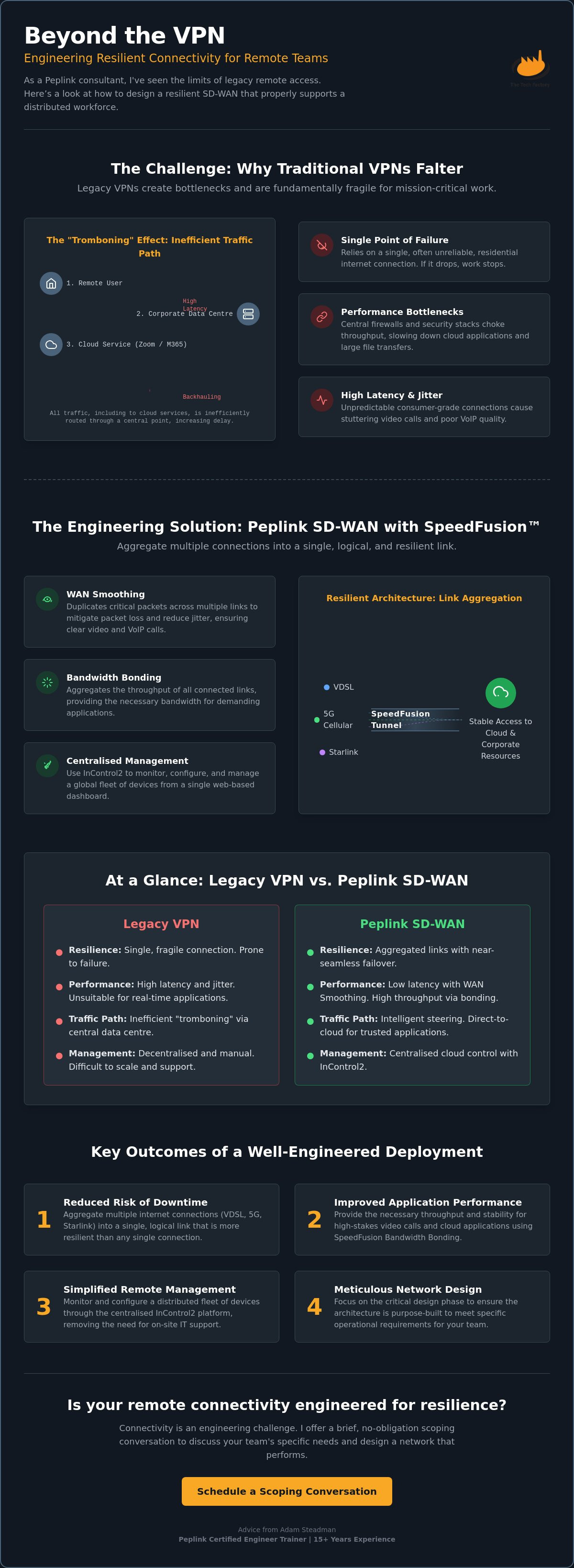
One of the most significant architectural flaws is the "tromboning" effect. Traffic from a remote user's home travels to a central data centre to be inspected before it's sent back out to a cloud service like Microsoft 365 or Zoom. This backhauling creates unnecessary latency and consumes expensive data centre bandwidth. When you combine this with the unpredictable nature of consumer-grade ISP performance, the results are often session drops during mission-critical VoIP or video calls. Consumer-grade ISPs are built for asymmetric traffic patterns and best-effort delivery. They aren't designed for the sustained, high-bandwidth demands of a professional engineer or broadcast specialist working from home. We've moved beyond the era where access was the only goal. Now, the priority is engineering a resilient environment that can withstand the fluctuations of the public internet.
The Latency and Bottleneck Problem
Packet delay isn't just about physical distance; it's about the overhead. Encryption and data centre hair-pinning add milliseconds that real-time protocols simply cannot tolerate. In my work with broadcast and public safety sectors, I see how jitter cripples SIP and SRT streams. Standard public internet connections offer no Quality of Service (QoS) mechanisms. Without the ability to prioritise traffic, a background cloud backup can easily degrade a vital video conference. A Software-Defined Wide Area Network (SD-WAN) approach addresses this by providing the intelligence to manage these paths more effectively, ensuring that mission-critical data takes the most stable route available.
Security vs Performance Trade-offs
Many organisations find that their traditional security stacks choke remote throughput. While rigorous inspection is necessary, routing all traffic through a central firewall often creates a bottleneck that hampers productivity. In our network designs, we advocate for direct-to-cloud routing for trusted SaaS applications. This bypasses the data centre for non-sensitive traffic whilst maintaining a secure tunnel for internal resources. We balance security with performance by implementing granular traffic steering policies. This ensures that protection doesn't come at the cost of the user experience. By decentralising the security perimeter, we reduce the load on central infrastructure and provide a more responsive SD-WAN for remote workforce environment.
Engineering Resilience: How Peplink SpeedFusion Supports Distributed Teams
SpeedFusion is the core technology that enables a truly resilient SD-WAN for remote workforce deployment. It isn't a single feature; it's a suite of protocols designed to aggregate multiple physical WAN links into one logical, persistent connection. In my 15 years of engineering these environments, I've found that the most common failure point for remote users is the reliance on a single ISP. SpeedFusion addresses this by treating every available path, whether it's VDSL, Starlink, or 5G, as part of a unified resource. The technical architecture of SD-WAN relies on decoupling network control from the underlying hardware; however, for a remote engineer, the physical edge is where the battle for stability is won.
One of the most powerful tools in this suite is WAN Smoothing. This technology works by duplicating packets across multiple links to mitigate the impact of packet loss. For video feeds or real-time telemetry, this redundancy is vital. It doesn't necessarily increase your total bandwidth, but it significantly improves the quality of the stream by filling in the gaps caused by a jittery connection. In our experience, this is often the difference between a clear video conference and a pixelated, stuttering session that disrupts a briefing.
Bandwidth Bonding and Hot Failover
I often configure Bandwidth Bonding to combine a standard fixed-line connection with a secondary 5G link. This creates a single logical pipe that provides high throughput for data-heavy tasks like large file transfers or high-definition streaming. Whilst bonding increases capacity, Hot Failover ensures continuity. If your primary fibre line drops during a live broadcast, SpeedFusion shifts the traffic to the cellular link so quickly that the session remains active. It isn't an absolute guarantee of uptime, but the sub-second transition is near-seamless, preventing the session drops that plague traditional VPNs. I've seen this prevent total communication failure in public safety scenarios where a vehicle moved between different network coverage zones whilst maintaining a vital data link.
Prioritising Mission-Critical Traffic
Not all data is created equal. In a remote node, a background OS update shouldn't be allowed to contend for bandwidth with a Teams call. We implement application-aware routing to ensure that latency-sensitive traffic always receives the best possible path. By de-prioritising non-essential background traffic, we preserve the integrity of the user's primary workspace. Configuring these complex rules requires a deep understanding of both the hardware and the specific needs of the organisation. Our Peplink deployment services focus on tailoring these traffic steering policies to match the operational priorities of your team. For organisations looking to scale these environments, our network design consultancy provides the blueprint for a resilient, professional-grade remote network.
Evaluating SD-WAN Deployment for Different Remote Scenarios
Remote work is often discussed as a single category, but from an engineering perspective, the requirements vary wildly based on the cost of failure. An executive making high-stakes decisions from a home office has different needs than a rapid-response team in a temporary command centre. When we design an SD-WAN for remote workforce deployment, we start by categorising these needs to ensure the hardware and configuration match the operational stakes. In our experience, failing to differentiate between these scenarios leads to either over-engineered, costly setups or, more commonly, under-powered solutions that fail when they are needed most.
The Executive Home Office
For senior leaders and key decision-makers, connectivity must be as reliable as the head office. A standard consumer router cannot provide the resilience required for professional-grade operations. I typically recommend small-form-factor Peplink hardware that integrates seamlessly into a residential environment whilst providing professional-grade features like SpeedFusion. By using a secondary 4G or 5G path alongside the primary fixed-line broadband, we create a resilient architecture that reduces the risk of a total blackout during a board meeting or critical negotiation. This setup provides a true "corporate-grade" experience, ensuring that internal applications and secure tunnels remain stable regardless of local ISP fluctuations. It's about creating a "zero-touch" environment for the user, where the complexity of the network is handled entirely by the edge device.
Rapid-Response and Temporary Remote Sites
Temporary sites, such as construction site offices or emergency command centres, present a different set of challenges. These environments often lack fixed-line infrastructure, making cellular-heavy deployments the primary choice. We engineer these solutions using mobile routers equipped with multiple cellular modems to aggregate signals from different carriers. This is particularly effective for teams that move frequently and require immediate connectivity upon arrival. For organisations managing these types of mobile operations, understanding the nuances of SD-WAN for fleet management is essential. Whilst a home office relies on a mix of fixed and mobile paths, a rapid-response unit often depends entirely on the diversity of cellular networks and, increasingly, satellite integration to maintain a stable SD-WAN for remote workforce environment. We focus on ensuring that even in areas of poor coverage, the combination of high-gain antennas and multi-carrier bonding provides a usable, professional connection.
Centralised Management and Visibility with InControl2
The primary logistical hurdle in any SD-WAN for remote workforce deployment is the absence of on-site IT support. You cannot expect a remote engineer or a senior executive to troubleshoot complex routing tables or manage security patches. Peplink InControl2 solves this by providing a centralised management layer that removes the burden from the end user. It allows us to treat a thousand home offices or temporary sites as a single, cohesive network. In my experience, this level of oversight is the only way to maintain the rigorous standards required for mission-critical operations.
Centralised management is about more than just convenience; it is about maintaining a consistent security posture across the entire organisation. We use InControl2 to push remote firmware updates and configuration changes simultaneously. This ensures that every node on the network is running the latest security patches and following the same traffic steering policies. If a vulnerability is identified, we can remediate it across the entire fleet in minutes. Without this capability, a distributed workforce becomes a collection of unmanaged and potentially insecure endpoints.
Zero-Touch Provisioning at Scale
Zero-touch provisioning is a technical necessity for national or global rollouts. The process is straightforward: we ship the hardware directly to the user's location. Once the device is connected to the internet, it automatically contacts InControl2 and pulls down its specific configuration. I use pre-defined templates to ensure that every device adheres to our engineered security and performance baselines. This approach significantly reduces deployment time and eliminates the risk of manual configuration errors. We've managed rollouts where hundreds of sites were brought online in a fraction of the time required for traditional VPN setups. It's a methodical, repeatable process that guarantees every remote node is configured correctly from day one.
Proactive Monitoring and Custom Portals
Visibility is the foundation of network resilience. Through InControl2, we monitor link health and cellular signal quality in real time. We can track specific metrics such as RSRP and RSRQ to identify degrading 5G connections before they impact the user's experience. This "single pane of glass" view allows our team to be proactive rather than reactive. We often see a failing link and shift traffic to a secondary path before the remote user even notices a problem. For non-technical stakeholders, we develop custom management portals that present this data in a simplified, actionable format. This provides high-level visibility into the health of the entire remote workforce without the need for deep technical expertise. If you require professional oversight for your distributed network, our InControl2 onboarding and managed services provide the expertise needed to maintain a stable, visible environment.
Strategic Planning for Remote SD-WAN Infrastructure
Transitioning to an SD-WAN for remote workforce environment is a significant infrastructure investment that requires meticulous planning. It is not a matter of simply replacing a software client; it is about re-engineering how your organisation handles data at the edge. In my 15 years as a Peplink consultant, I've found that the most successful deployments are those that prioritise the network design phase over hardware procurement. A well-designed network can adapt to changing conditions, whilst a poorly planned one will likely replicate the same failures of the VPN it replaced. This shift from reactive firefighting to proactive engineering is what defines a resilient distributed team.
We view this transition as a long-term strategic move. It requires a clear understanding of the operational stakes and a commitment to building a network that supports high-level professional tasks. The initial design must account for local infrastructure limitations, security requirements, and the specific application mix used by your workforce. By treating the remote node as a permanent part of the corporate WAN, we can apply the same standards of reliability and visibility that you would expect in a traditional office or data centre.
Scoping Your Connectivity Requirements
Scoping begins with a realistic evaluation of your existing bandwidth versus your required resilience. I look beyond raw throughput and focus on path diversity. One common pitfall in multi-carrier cellular strategies is relying on different providers that share the same physical mast infrastructure. If that mast fails, your redundancy disappears. Selecting the right Peplink hardware is equally critical. A device must be chosen based on its ability to handle specific SpeedFusion workloads, whether that involves heavy Bandwidth Bonding or simple Hot Failover. We ensure that the hardware capacity matches the throughput requirements of the remote node, avoiding bottlenecks before they occur. It's about selecting the right tool for the specific environment, whether that is a residential home office or a mobile site office.
Building In-House Competence through Training
Technology is only as effective as the team managing it. For a long-term deployment to succeed, your internal IT team must understand the "why" behind the configuration. As a Peplink Certified Engineer Trainer, I prioritise knowledge transfer as part of our consultancy. We don't just deploy a solution and walk away; we ensure your engineers are equipped to manage and optimise the environment. This involves understanding traffic steering, monitoring signal health, and managing the InControl2 platform. Understanding these technical nuances reduces the risk of configuration drift and ensures the network remains resilient as your organisation grows. If you are ready to move beyond fragile connections and engineer a more resilient network, I invite you to a brief scoping conversation regarding your specific connectivity needs. We can discuss your current challenges and outline a design that supports your distributed team effectively.
Advancing Beyond Legacy Connectivity
Relying on a standard VPN for professional-grade remote work is a compromise that eventually leads to operational failure. We have explored how a robust SD-WAN for remote workforce strategy replaces these fragile tunnels with engineered resilience. By aggregating multiple links through SpeedFusion and maintaining centralised visibility via InControl2, you provide your team with a network that is both stable and manageable at scale. The transition from reactive troubleshooting to proactive network design is essential for any organisation operating in mission-critical sectors.
With over 15 years of experience as a Peplink Certified Engineer Trainer and advisor to Peplink’s largest global distributor, I specialise in designing deployments where reliability is the primary requirement. Our team focuses on the technical nuances that ensure your remote infrastructure performs under pressure. If you are ready to move past the limitations of legacy access, I invite you to book a scoping conversation to discuss your specific connectivity needs. We look forward to helping you build a more resilient distributed environment.
Frequently Asked Questions
Is SD-WAN for a remote workforce better than a traditional VPN?
Yes, because it addresses the inherent fragility of single-path connections. A traditional VPN relies on one ISP; if that link fluctuates or fails, the tunnel collapses and the session drops. An SD-WAN for remote workforce deployment uses SpeedFusion to aggregate multiple paths, ensuring that a mission-critical video call or secure session continues even if one provider experiences an outage. It moves the focus from simple access to engineered resilience.
What Peplink hardware is best for a home-based remote worker?
For a professional home office, I typically recommend small-form-factor routers such as the Peplink B One or the MAX BR1 Mini. These devices provide enterprise-grade SpeedFusion capabilities in a quiet, compact chassis suitable for residential environments. They allow you to integrate a secondary cellular or satellite link alongside your primary fixed-line broadband. This creates a corporate-grade network footprint without the need for complex rack-mounted equipment.
Does SD-WAN require a specific type of internet connection?
No, SD-WAN is transport-agnostic and works with any available internet connection. It functions effectively across VDSL, fibre, cellular, and satellite links like Starlink. In my experience, the most resilient SD-WAN for remote workforce setups use a mix of different transport types. This diversity ensures that a physical issue affecting one medium, such as a local cable fault, doesn't take the entire remote node offline.
Can I use cellular data as a backup for my remote team?
Yes, cellular data is a core component of a resilient remote network architecture. We frequently configure 4G or 5G links as a secondary path for Hot Failover. If the primary fixed-line connection fails, traffic shifts to the cellular modem in less than a second. This transition is near-seamless, meaning active sessions like VoIP or terminal connections remain active whilst the router handles the underlying link failure.
How does SpeedFusion differ from standard load balancing?
Standard load balancing distributes different sessions across multiple links, but it cannot protect a single session if its specific link fails. SpeedFusion aggregates multiple links into one logical tunnel. This allows for advanced features like Bandwidth Bonding and WAN Smoothing. If one link in the bond fails, the packets simply continue to flow over the remaining paths. The session doesn't reset because the logical connection remains intact.
What is the cost of deploying SD-WAN to a distributed workforce?
The investment for an SD-WAN rollout varies based on the hardware selected and the complexity of the network design. You need to account for the initial hardware, any required SpeedFusion licensing, and the ongoing management of the environment. Whilst we provide specific quotes only after a scoping session, the cost is an investment in reducing the significant business impact of downtime and poor application performance for your remote team.
Do I need a specialist to configure SpeedFusion for my team?
Whilst an internal IT team can handle basic configurations, a specialist ensures the architecture is engineered for mission-critical stability. Optimising traffic steering and SpeedFusion parameters requires a deep understanding of how different links behave under load. I often act as a consultant to design the initial environment and then provide training to the internal team. This ensures the organisation has the competence to manage the fleet long-term.
Is it possible to manage 100+ remote SD-WAN sites centrally?
Managing hundreds of remote sites is straightforward using the Peplink InControl2 platform. It provides a centralised management layer that allows us to monitor link health, push firmware updates, and enforce security policies across the entire organisation. This "single pane of glass" view eliminates the need for on-site IT support at every home office. It ensures that every remote node adheres to the same engineered standards, regardless of its location.